If any questions are missing, let the author know - the material can be supplemented.
Theory
Basic Python
Data Types
Immutable:
intfloatboolstrtuple, for example('apple', 1, 2)NoneType(value typeNone)frozensetChangeable:listsetdict
What can be a dictionary key
The dictionary key must be hashable: have a stable hash value and compare correctly with other keys. Most mutable built-in containers (list, dict, set) are not hashed. Immutability by itself does not guarantee hashability: e.g. tuplecontaining list, also cannot be used as a key. More details in Python glossaries.
What is a lambda function
lambda creates a small anonymous function. It can take several parameters, but its body consists of exactly one expression; the result of this expression is returned without explicit return.
a = [1, 2, 3, 'sss']
print(list(filter(lambda x: isinstance(x, int), a))) # [1, 2, 3]
Context Managers
Context manager - an object that implements the protocol
__enter__/__exit__and controls entry into and exit from the context. Context managers are used to work with files, connections, locks, sessions and other resources. The exit method is also called upon normal block completion.with, and upon exception, so it is convenient to guarantee the release of a resource.
An example of working with a file via with ... as ...:
>>> with open('hello.txt', 'a') as file:
...     file.write('\nHello Python!')
...
... closed = file.closed
... print("Is the file closed?", closed)
...
Is the file closed? True
Implementing a context manager
You can implement your own context manager using methods __enter__ and __exit__:
class File:
    def __init__(self, file_name, mode):
        self.file_obj = open(file_name, mode)

    def __enter__(self):
        return self.file_obj

    def __exit__(self, exc_type, exc_value, traceback):
        self.file_obj.close()
Exception Handling
Method __exit__ accepts an exception type, an exception instance, and a traceback. If there was no exception, all three values are equal None. A true return value suppresses the exception; false value including None, allows it to spread further.
Decorator contextlib.contextmanager
With contextmanager You can define a context manager with a generator function instead of a separate class:
from contextlib import contextmanager

@contextmanager
def open_file(name):
    f = open(name, 'w')
    try:
        yield f
    finally:
        f.close()
Exceptions
Exceptions are a mechanism for transmitting and processing information about error and other exceptional situations during program execution. Syntax:
try:
    выполняем_операцию()
except Exception as e:
    обработать_исключение(e)
else:
    выполнить_при_успехе()
finally:
    освободить_ресурсы()
Hierarchy of exceptions
- Base exception
- SystemExit
- KeyboardInterrupt
- Generator exit
- Exception
- Stop iteration …
Complete hierarchy

- BaseException - the basic exception from which all others originate.
- SystemExit - an exception thrown by the sys.exit function when exiting the program.
- KeyboardInterrupt - generated when the program is interrupted by the user (usually with the Ctrl+C key combination).
- GeneratorExit - generated when calling the close method of the generator object.
- Exception - and here the completely systemic exceptions (which are best not touched) end and ordinary ones begin, with which you can work.
- StopIteration - generated by the built-in next function if there are no more elements in the iterator.
- ArithmeticError - arithmetic error.
- FloatingPointError - generated when a floating point operation fails. In practice it occurs rarely.
- OverflowError - Occurs when the result of an arithmetic operation is too large to represent. Doesn't appear when working with integers normally (since python supports long numbers), but can occur in some other cases.
- ZeroDivisionError - division by zero.
- AssertionError - the expression in the assert function is false.
- AttributeError - the object does not have this attribute (value or method).
- BufferError - the operation associated with the buffer cannot be performed.
- EOFError - the function came across the end of the file and could not read what it wanted.
- ImportError - import of a module or its attribute failed.
- LookupError - incorrect index or key.
- IndexError - index is not in the range of elements.
- KeyError - non-existent key (in a dictionary, set or other object).
- MemoryError - not enough memory.
- NameError - no variable with the same name was found.
- UnboundLocalError - a reference is made to a local variable in a function, but the variable is not previously defined.
- OSError - error related to the system.
- BlockingIOError
- ChildProcessError - failure of an operation with a child process.
- ConnectionError - base class for connection-related exceptions.
- BrokenPipeError
- ConnectionAbortedError
- ConnectionRefusedError
- ConnectionResetError
- FileExistsError - an attempt to create a file or directory that already exists.
- FileNotFoundError - the file or directory does not exist.
- InterruptedError - the system call was interrupted by an incoming signal.
- IsADirectoryError - a file was expected, but this is a directory.
- NotADirectoryError - a directory was expected, but this is a file.
- PermissionError - lack of access rights.
- ProcessLookupError - the specified process does not exist.
- TimeoutError - the waiting time has ended.
- ReferenceError - attempt to access an attribute with a weak link.
- RuntimeError - occurs when the exception does not fall into any of the other categories.
- NotImplementedError - can be explicitly thrown away for an operation that has not yet been implemented. For mandatory method overriding, you usually use
abc.abstractmethod; not to be confused with constantNotImplemented. - SyntaxError - syntax error.
- IndentationError - incorrect indentations.
- TabError - mixing tabs and spaces in indents.
- SystemError - internal error.
- TypeError - the operation was applied to an object of the wrong type.
- ValueError - the function receives an argument of the correct type, but an incorrect value.
- UnicodeError - bug related to unicode encoding/decoding in strings.
- UnicodeEncodeError - exception related to unicode encoding.
- UnicodeDecodeError - exception related to unicode decoding.
- UnicodeTranslateError - exception related to unicode translation.
- Warning - warning.
Decorator
Decorator - a callable that is applied to a function or class, and the result is associated with the original name. A decorator often returns a wrapper function, but this is not a requirement. An example of a decorator in Python:
def decorator_function(func):
    def wrapper():
        print('Входим в обёртку')
        result = func()
        print('Выходим из обёртки')
        return result

    return wrapper

# без сахара - hello_world = decorator_function(hello_world).
@decorator_function
def hello_world():
    print('Hello world!')

hello_world()
# Входим в обёртку
# Hello world!
# Выходим из обёртки
Decorator with arguments:
def benchmark(iters):
    def actual_decorator(func):
        import time

        def wrapper(*args, **kwargs):
            total = 0
            for i in range(iters):
                start = time.time()
                return_value = func(*args, **kwargs)
                end = time.time()
                total = total + (end-start)
            print('[*] Среднее время выполнения: {} секунд.'.format(total/iters))
            return return_value

        return wrapper
    return actual_decorator

@benchmark(iters=10)
def fetch_webpage(url):
    import requests
    webpage = requests.get(url)
    return webpage.text
What is an iterator
An iterator is a behavioral design pattern that allows you to sequentially traverse the elements of composite objects without revealing their internal representation. The topic of iterators has 3 components:
- Iterable object provides
__iter__(). For the sequence protocol, fallback is possible via__getitem__()with indexes from 0 toIndexError. - Iterator implements
__next__()and__iter__(), which is returned by the iterator itself.__next__()returns the next element or throws it awayStopIteration. - Iteration - the process of obtaining elements from a source, such as a list
my_list = [1, 2, 3, 4, 5]
my_iterator = iter(my_list)
print (next(my_iterator))
print (next(my_iterator))
print (next(my_iterator))
What is a generator
Generator is an object that implements the iterator protocol, where the generator does not store the entire iterable set of elements in memory, instead generating elements on the fly. Generation can occur by algorithm or by reading a collection/file.
rangeis not a generator, but a lazily calculated immutable sequence. Generator functions use the keywordyield: It gives a value and pauses execution while saving the state. Next challengenext()continues function afteryield. Generator function — any function containing the yield keyword Generator Expressions
[x * x for x in range(10)]
# [0, 1, 4, 9, 16, 25, 36, 49, 64, 81]
(x * x for x in range(10))
# <generator object <genexpr> at 0x7fe76f7e5db0>
What is a ternary operator
some = True
result = 1 if True else 0
print(result) # 1
What is the difference between == and is
== compares values is — identity of objects. The memory address is an implementation detail, not the semantics of the operator is.
a = [1, 2, 3]
b = [1, 2, 3]
print (a == b) # True
print (a is b) # False
How to pass arguments to a function in python
Python uses call by sharing: the function parameter is associated with the same object that the caller passed. Rebinding a local name does not change the name externally, and the mutation of a shared mutable object is visible to the calling code.
What are type annotations, why are they needed and when are they used?
This is a type hint. This occurs in functions and classes. They don't check types. Annotations are needed so that other developers can see what type of data is being passed to the function.
Shallow and deep copying
There is a copy module that contains the .copy and deepcopy functions.
Surface copy
Shallow copy creates a new object and allocates a memory location for it
and inserts into it the links found in the original.
import copy
some_list = [1, [2], 3]
print(some_list is copy.copy(some_list)) # False
print (some_list[1] is copy.copy(some_list)[1]) # True
Deep copy
deepcopy recursively copies compound mutable objects and saves memo to work with loops. This does not mean that absolutely every nested object will necessarily be new: immutable objects and functions can be shared, and classes can configure copying.
import copy
some_list = [1, [2], 3]
print(some_list is copy.deepcopy(some_list)) # False
print (some_list[1] is copy.deepcopy(some_list)[1]) # False
List comprehension
List comprehension - list generators. Syntax: [выражение for val in коллекция]
Can be applied to iterable objects - list, dict, str, etc.
What is docstring
A Docstring in Python is a documentation string that describes what a Python function, method, module, or class does. This line is located at the beginning of the object definition and is used to generate documentation automatically. In other words, a docstring is used to create a description of an API and contains information about how to use a function or method, what arguments it takes, and what values it returns.
def add_numbers(a, b):
    """
    This function takes in two numbers and returns their sum
    """
return a + b
Closures
Closure - a function that is inside another function and refers to variables that are declared in the body of the outer function. In this case, the inner function is created each time the outer one is executed with new references to the variables from the outer function. If you need to change a mutable variable, everything happens as usual, however, when working with immutable types, an UnboundLocalError error may occur:
In [31]: def func1():
    ...:     a = 1
    ...:     b = 'line'
    ...:     c = [1, 2, 3]
    ...:
    ...:     def func2():
    ...:         c.append(4)
    ...:         a = a + 1
    ...:         return a, b, c
    ...:
    ...:     return func2
    ...:

In [32]: call_func = func1()

In [33]: call_func()
---------------------------------------------------------------------------
UnboundLocalError                         Traceback (most recent call last)
<ipython-input-33-9288e4e0f32f> in <module>
----> 1 call_func()

<ipython-input-31-56414e2c364b> in func2()
      6     def func2():
      7         c.append(4)
----> 8         a += 1
      9         return a, b, c
     10

UnboundLocalError: local variable 'a' referenced before assignment

In [34]: for item in call_func.__closure__:
    ...:     print(item, item.cell_contents)
    ...:
<cell at 0xb12174c4: str object at 0xb732d720> line
<cell at 0xb1217af4: list object at 0xb11e5dac> [1, 2, 3, 4]
If you need to assign a different value to a free variable, you must explicitly declare it as nonlocal:
In [40]: def func1():
    ...:     a = 1
    ...:     b = 'line'
    ...:     c = [1, 2, 3]
    ...:
    ...:     def func2():
    ...:         nonlocal a
    ...:         c.append(4)
    ...:         a += 1
    ...:         return a, b, c
    ...:
    ...:     return func2
    ...:

In [41]: call_func = func1()

In [42]: call_func()
Out[42]: (2, 'line', [1, 2, 3, 4])

In [43]: for item in call_func.__closure__:
    ...:     print(item, item.cell_contents)
    ...:
<cell at 0xb11fc6bc: int object at 0x836bef0> 2
<cell at 0xb11fcdac: str object at 0xb732d720> line
<cell at 0xb11fc56c: list object at 0xb117fe2c> [1, 2, 3, 4]
Sets, tuples
Sets
A set is a collection, equivalent to sets in mathematics, that stores an unordered set of unique, immutable data.
- Sets are unordered
- Sets are implemented based on HashTable, so they can only store hashable (immutable) values - numbers, strings, tuples, etc.
- Elements are unique in many ways
- There is a regular set and a frozenset. Set is a mutable structure, Frozenset is an immutable structure
- By analogy with list comprehension there is set comprehension
- Set is a subtype of Collection, therefore it defines operations for checking for inclusion (a in set), the length of the collection, and it is possible to iterate over them (iterable)
Tuples
Tuples, like lists, are designed to store sets of data of any type. However, unlike lists, they are immutable.
- Tuples do not support adding or removing elements
- Does not allow changing elements (a[0]=10)
- But at the same time they allow you to change internal mutable objects
- Tuples are implemented in the same way as lists - using arrays and object references
- Reuse of an empty tuple and internal freelist optimizations are details of a specific CPython version, not a language guarantee. Application code should not depend on them.
*args and **kwargs
argsand*kwargsare special parameters in Python that allow you to pass a variable number of arguments to a function. Parameter*argsused to pass a variable number of arguments without a keyword. It is a tuple of all additional arguments passed to the function. Parameter**kwargsused to pass a variable number of named arguments. It is a dictionary of all additional named arguments passed to the function.
How to view an object's methods?
To see all the methods and attributes associated with a particular object in Python, you can use the function dir()
globals() and locals()
globals() returns mapping of the global namespace of the current module. Built-in names are in a separate space builtins, although the module usually contains a link __builtins__.
locals() returns mapping of the current local namespace. The rules for reflecting changes in this mapping depend on the scope, so you should not use it to change local variables.
x = 5
y = 10

def my_func(z):
    a = 3
    print(globals()) # выводит все глобальные переменные
    print(locals()) # выводит все локальные переменные

my_func(7)
slice
Slice (slice) is a way to extract a specific part of a sequence (e.g. string, list, tuple) using indexing. The syntax for creating a slice is:
sequence[start:end:step]
where start - index from which extraction begins (inclusive), end - the index at which the extraction ends (not including it), and step - step for retrieving elements (default is 1).
an empty list cannot be used as a default argument
Default values for function arguments are evaluated only once when the function is defined, not every time it is called. Thus, if you try to use a mutable data type (such as a list) as the default argument to a function, then each function call that changes that value will also change the default value for all subsequent calls to the function. This can lead to various surprises and unexpected consequences. The empty list is a mutable data type in Python, so its use as a default argument is not recommended. Instead it is better to use None as the default and create a new empty list inside the function if a list is required. Something like this:
def my_function(my_list=None):
    if my_list is None:
        my_list = []
    # do something with my_list
    return my_list
id() method
Function id() returns an integer object identifier that is unique during the life of this object. In CPython this is often a memory address, but the language standard does not guarantee this; after the object is destroyed, the value can be reused. For example, if you have two variables that refer to the same object, then their IDs will be equal:
a = [1, 2, 3]
b = a
print(id(a))
print(id(b))
pdb
pdb is an interactive debugger for Python, with which you can navigate through the code while running your program, view and change the values of variables, navigate through the code line by line (including delving into code nesting), assign breakpoints and all other operations inherent in a debugger. Module pdb provides a command line interface that you can use to interact with Python code while it is running. You can enter the mode pdb in your Python program by inserting the following line of code where you want to stop the debugger:
import pdb;
pdb.set_trace()
try…except…else
Branch else in design try ... except ... else will only be executed if no exception was raised in the block try. If in the block try an exception occurs, program execution moves to the corresponding block except, and branch else skipped. If the block except is not specified, the exception will be raised further and the program will exit with an error message.
a, b = map(int, input().split())
try:
    print(a / b)
except ZeroDivisionError:
    print('Деление на ноль')
else:
    print('Ошибки не было')  # это выводится, если исключения не возникло
How are dict and set implemented internally? What is the difficulty of obtaining the item? How much memory does each structure consume?
Dict and Set implemented as a hash table. A hash table is a data structure that uses a hash function to convert a key into an index into an array where the values are stored. The element is then added to the array at the appropriate index. This is how a hash table works:
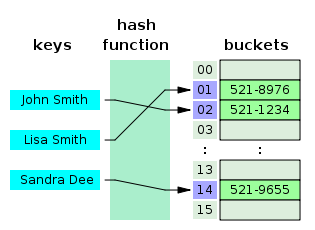 img In CPython getting, adding and removing an element
 dict/set usually have medium difficulty O(1), and in the pathological worst case - O(n).
How are arguments passed to functions: by value or by reference?
In Python, arguments are passed by object reference. This means that when you pass an object as an argument to a function, the function receives a reference to that object, not a copy of it. If you modify an object inside a function, those changes will be reflected outside the function because both variables (inside and outside the function) refer to the same object in memory. However, if inside a function you assign a new value to an argument, it will not change the value of the variable you used when calling the function, because that variable still refers to the same object in memory. For example:
def increment(x):
    x += 1
return x

y = 10
print(increment(y)) # Output: 11
print(y) # Output: 10
How to speed up existing python code?
To speed up existing Python code, you can use several approaches:
- Vectorization: Vectorization allows you to optimize code that performs a large number of operations on data arrays, for example, using the NumPy library.
- Choosing the Right Data Structures: Choosing the right data structures and algorithms can significantly speed up code execution. For example, using dictionaries can be more efficient than using lists.
- Runtime/compilation selection: CPython already compiles source code to bytecode, and
.pycmainly speeds up imports. For suitable workloads, you can explore PyPy, Cython, Nuitka or native extensions and be sure to measure the result. - Competitiveness: threads and async are usually useful for I/O-bound tasks; CPU-bound code in regular CPython is more often parallelized by processes or transferred to native code that frees up the GIL.
- Parallelism: Running tasks in parallel on multiple processor cores can speed up code execution.
- Optimization: Tools like cProfile and line_profiler can help optimize your code by identifying execution bottlenecks and providing information about the execution time of each line of code. Trade-offs: If code execution cannot be speeded up to an acceptable level, you can consider making trade-offs, such as reducing the amount of data processed by the code or simplifying the task execution logic.
Is Python an imperative or declarative language?
Python is an imperative programming language. In imperative programming, the programmer writes a sequence of commands for the computer to execute. Python also supports some functional and object-oriented programming concepts, but its main approach is imperative. "Imperative language" is a term for programming languages that use direct commands to control the computer, unlike declarative languages. In imperative languages, the programmer explicitly describes the actions the computer should perform rather than only the desired result. Examples include Java, C, C++, Python and JavaScript. Declarative language allows you to describe the desired result without specifying a step-by-step algorithm for achieving it. Examples of declarative languages and notations are SQL and HTML.
Which functions from collections and itertools are you using?
In modules collections and itertools Python has many useful functions that can be used in various tasks. Some of the most commonly used features include:
defaultdict: This is a convenient way to create a dictionary with a given default value for any key that has not yet been added to the dictionary.
from collections import defaultdict
d = defaultdict(int)
print(d['apple'])

d = defaultdict(list)
print(d['apple'])

d = defaultdict(set)
print(d['apple'])

# вывод:
# 0
# []
# set()
Counter: This is a convenient way to count the number of elements encountered in a list or other iterable object. It returns an object that can be used as a dictionary, where the keys are the elements and the values are the number of occurrences of them.
from collections import Counter
cnt = Counter(['red', 'blue', 'red', 'green', 'blue', 'blue'])
print(cnt)
print(dict(cnt))

# вывод:
# Counter({'blue': 3, 'red': 2, 'green': 1})
# {'red': 2, 'blue': 3, 'green': 1}
namedtuple: You can create a named tuple with given fields, which can be useful for working with data that has a structure but does not require creating a class.
from collections import namedtuple

Point = namedtuple("Point", "x y")
print(issubclass(Point, tuple))

point = Point(2, 4)
print(point)

print(point.x)
print(point.y)

print(point[0])
print(point[1])

# вывод:
# True
# Point(x=2, y=4)
# 2
# 4
# 2
# 4
itertools.chain: Allows you to concatenate multiple iterable objects into a single iterator.
from itertools import chain

chained = chain('ab', [33])
print(next(chained))
print(next(chained))
print(next(chained))
# вывод:
# a
# b
# 33

for i in chain('1', [1, 2, 3], {3, 4}):
    print(i)
# вывод:
# 1
# 1
# 2
# 3
# 3
# 4

for i in chain('1', [1, {2, (5, '6')}, 3], {3, 4}):
    print(i)
# вывод:
# 1
# 1
# {2, (5, '6')}
# 3
# 3
# 4
itertools.groupby: Allows you to group the elements of an iterable by a given key.
groupby() combines only adjacent elements with the same key. For global grouping, the input is usually pre-sorted by the same key.
from itertools import groupby

grouper = lambda item: item['country']

data = [
    {'city': 'Москва', 'country': 'Россия'},
    {'city': 'Новосибирск', 'country': 'Россия'},
    {'city': 'Пекин', 'country': 'Китай'},
]

for key, group in groupby(data, key=grouper):
    print(key, *group)

# Россия {'city': 'Москва', 'country': 'Россия'} {'city': 'Новосибирск', 'country': 'Россия'}
# Китай {'city': 'Пекин', 'country': 'Китай'}
itertools.combinations and itertools.permutations: generate all the different combinations or permutations of elements from a given set.
from itertools import combinations

print(list(combinations('123', 2)))

# [('1', '2'), ('1', '3'), ('2', '3')]
from itertools import permutations

print(list(permutations('123', 2)))

# [('1', '2'), ('1', '3'), ('2', '1'), ('2', '3'), ('3', '1'), ('3', '2')]
O-notation
Lists:
| Operation | Time complexity (in Big O) |
|---|---|
| Access by index | O(1) |
| Insert at the beginning | O(n) |
| Insert at the end | O(1) (on average) |
| Middle insert | O(n) |
| Delete by index | O(n) |
| Search for an element | O(n) |
| Sorting | O(n log n) |
Sets and dictionaries:
| Operation | Time complexity (in Big O) |
|---|---|
| Key access | O(1) (on average) |
| Insert | O(1) (on average) |
| Delete by key | O(1) (on average) |
Strings:
| Operation | Time complexity (in Big O) |
|---|---|
| Access by index | O(1) |
| Concatenation | O(n) |
| Search for a substring | O(n * m), where n is the length of the string and m is the length of the substring |
| Comparison | O(n) |
| Change by index | Not possible: str is immutable |
Operations with numbers
For int arbitrary precision arithmetic cost depends on the number of digits. Evaluation O(1) valid only under the explicit assumption that the size of the number is limited by the machine word.
| Operation | Time complexity (in Big O) |
|---|---|
| Addition | O(n) in number of digits |
| Subtraction | O(n) in number of digits |
| Multiplication | Depends on the number of digits and algorithm |
| Division | Depends on the number of digits and algorithm |
Multithreading and multiprocessing
The differences between multiprocessing, multithreading and asynchrony, and the GIL
Processes and threads
Starting a new application on a computer starts a process. Processes operate independently and in isolation at the operating system level. Processes can be divided into system processes, which support the system, and user processes: applications and tasks started by the user.
Process - a running instance of a program, an independent entity to which the operating system allocates resources. A process is a container abstraction that does not execute anything by itself but contains the execution context, resources, files and threads.
Thread - an operating system entity that executes a sequence of instructions on a processor. Threads allow two or more tasks within a process to run concurrently. Threads have priorities, and the operating system controls their scheduling and allocation of processor time. Threads share memory and execution context
Multithreading and multiprocessing
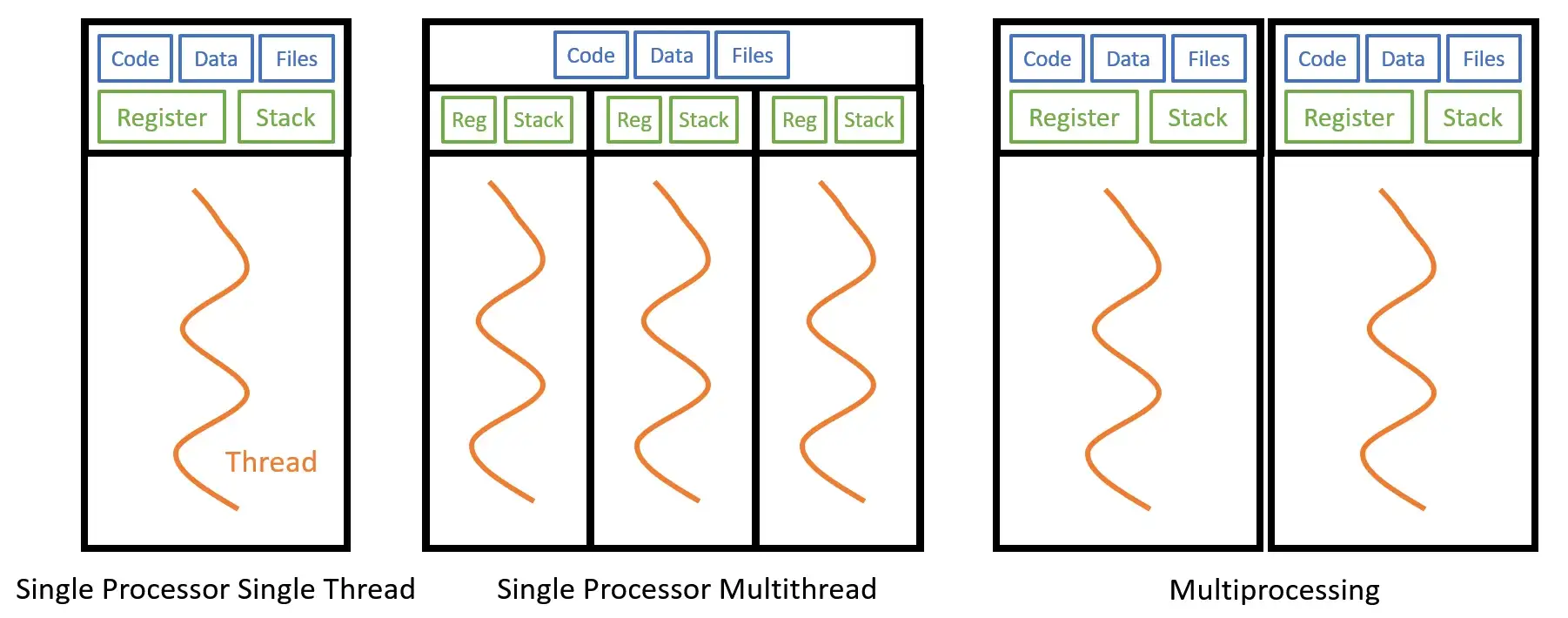 By definition:
Multithreading (multithreading) - an execution model in which an application task runs across multiple threads.
Multiprocessing - an execution model in which an application task runs across multiple independent processes.
By definition:
Multithreading (multithreading) - an execution model in which an application task runs across multiple threads.
Multiprocessing - an execution model in which an application task runs across multiple independent processes.
CPU-bound and I/O-bound tasks
CPU-bound - tasks limited by CPU power and resources I/O-bound - tasks limited by slower devices or resources, such as a disk or network service. Multithreading is useful for I/O-bound tasks such as reading from disk, database queries or network operations: while one thread waits, the CPU can run another. Multiprocessing is useful for CPU-bound tasks and heavy computations.
GIL
The GIL (Global Interpreter Lock) is a mechanism in a standard CPython build that allows only one thread at a time to execute Python bytecode in an interpreter. Many I/O operations and some C extensions release the GIL, so threads remain useful for I/O-bound tasks. CPU-bound Python code typically uses processes, native libraries or a free-threaded CPython build.
Since Python 3.13, there is a separate free-threaded build of CPython in which the GIL can be disabled. Therefore, the statement about “one stream of bytecode” should be attributed to the regular build of CPython, and not to the Python language in general. See Python glossary and free threading documentation.
CPython uses reference counting in conjunction with a circular garbage collector. sys.getrefcount() shows the number of references, including the temporary reference passed to the function itself:
>>> import sys
>>> a = []
>>> b = a
>>> sys.getrefcount(a)
3
The GIL makes it easier to protect some of the internal state of a typical CPython build, but it does not automatically make custom multi-threaded code thread-safe or eliminate race conditions or deadlocks. Shared mutable data still requires correct synchronization. Questions
- What is multithreading and what benefits can it provide in software development?
- Multithreading is the execution of multiple threads in one process. It helps with responsiveness and I/O-bound concurrency; the actual parallelism of the CPU code depends on the Python implementation, the build of the interpreter, and whether native code releases the GIL.
- How to create a thread in Python? What methods are there to create threads?
- In Python, threads can be created using the module
threading. To create a thread, you can define a class that inherits fromthreading.Thread, or create an instancethreading.Threadindicating the function that will be executed in the thread.
- What is Global Interpreter Lock (GIL) in Python and how does it affect multithreading? What are the implications of using multithreading in Python due to the GIL?
- GIL (Global Interpreter Lock) is a mechanism used in CPython (the standard implementation of Python) that ensures that only one thread is executing Python bytecode at a given time. This means that a single Python process can only execute one Python instruction at a time. Because of the GIL, multithreading in CPython may not provide full parallelism and does not result in performance improvements for CPU-intensive tasks, but can be beneficial for I/O-intensive tasks or tasks in which locks are freed by the GIL.
- What Python modules do you know for working with multithreading?
- To work with threads, use the module
threading. Modulemultiprocessingruns separate processes and is related to multiprocessing rather than multithreading.
- What methods of synchronizing threads do you know in Python?
- Used to synchronize threads
threading.Lock,RLock,Condition,Semaphore,EventandBarrier. The thread-safe queue is provided by the modulequeue. Separatethreading.Mutexnot in the standard library; regularLockacts as a mutex.
Examples
Using Lock:
import threading

# Создаем блокировку
lock = threading.Lock()

# Функция, которая будет выполняться в потоке
def worker():
    # Захватываем блокировку
    lock.acquire()
    try:
        # Критическая секция, в которой происходит общий доступ к ресурсам
        print("Работник начал работу")
        # ...
        print("Работник закончил работу")
    finally:
        # Освобождаем блокировку
        lock.release()

# Создаем и запускаем поток
thread = threading.Thread(target=worker)
thread.start()
Using a condition variable:
import threading

# Создаем условную переменную
condition = threading.Condition()

# Общий ресурс
shared_resource = []

# Поток, который добавляет элемент в общий ресурс
def producer():
    with condition:
        # Проверяем условие перед выполнением операции
        while len(shared_resource) >= 5:
            condition.wait()  # Ожидаем сигнала
        shared_resource.append("Новый элемент")
        condition.notify()  # Оповещаем другие потоки

# Поток, который удаляет элемент из общего ресурса
def consumer():
    with condition:
        # Проверяем условие перед выполнением операции
        while len(shared_resource) == 0:
            condition.wait()  # Ожидаем сигнала
        item = shared_resource.pop()
        condition.notify()  # Оповещаем другие потоки
        return item

# Создаем и запускаем потоки
producer_thread = threading.Thread(target=producer)
consumer_thread = threading.Thread(target=consumer)
producer_thread.start()
consumer_thread.start()
Using Semaphore:
import threading

# Создаем семафор с максимальным количеством разрешений 2
semaphore = threading.Semaphore(2)

# Функция, которая будет выполняться в потоке
def worker():
    # Запрашиваем разрешение
    semaphore.acquire()
    try:
        # Критическая секция, в которой происходит общий доступ к ресурсам
        print("Работник начал работу")
        # ...
        print("Работник закончил работу")
    finally:
        # Освобождаем разрешение
        semaphore.release()

# Создаем и запускаем потоки
thread1 = threading.Thread(target=worker)
thread2 = threading.Thread(target=worker)
thread3 = threading.Thread(target=worker)
thread1.start()
thread2.start()
thread3.start()
Using a mutex:
import threading

# Создаем мьютекс
mutex = threading.Lock()

# Общий ресурс
shared_resource = 0

# Функция, которая будет выполняться в потоке
def worker():
    global shared_resource
    # Захватываем мьютекс
    mutex.acquire()
    try:
        # Критическая секция, в которой происходит общий доступ к ресурсу
        shared_resource += 1
    finally:
        # Освобождаем мьютекс
        mutex.release()

# Создаем и запускаем потоки
threads = []
for _ in range(5):
    thread = threading.Thread(target=worker)
    thread.start()
    threads.append(thread)

# Ждем завершения всех потоков
for thread in threads:
    thread.join()

print(shared_resource)
Using Queue:
import threading
import queue
import time

# Создаем очередь
q = queue.Queue()

# Функция, которая будет выполняться в потоке
def worker():
    while True:
        # Получаем элемент из очереди (блокирующая операция)
        item = q.get()
        if item is None:
            break
        # Обработка элемента
        print("Обработка элемента:", item)
        # Имитация длительной операции
        time.sleep(1)
        # Отмечаем элемент как обработанный
        q.task_done()

# Создаем и запускаем потоки
threads = []
for _ in range(5):
    thread = threading.Thread(target=worker)
    thread.start()
    threads.append(thread)

# Наполняем очередь элементами
for item in range(10):
    q.put(item)

# Ждем, пока все элементы будут обработаны
q.join()

# Добавляем в очередь пустые элементы для остановки потоков
for _ in range(5):
    q.put(None)

# Ждем завершения всех потоков
for thread in threads:
    thread.join()
- What is asynchronous programming and what benefits can it provide in software development?
- Asynchronous programming is a concurrent execution model in which a task voluntarily gives up control while waiting. This is especially useful for a large number of I/O-bound operations, but in itself does not mean parallel execution of CPU code.
- What Python modules do you know for working with asynchrony?
- In Python, you can use modules to work with asynchrony
asyncioandaiohttp. Moduleasyncioprovides basic tools for creating asynchronous applications, including event loops, coroutines, and coroutines. Moduleaiohttpprovides functionality for asynchronous web programming.
- What is an event loop in asynchronous programming? How does it work in Python?
- Event loop is a core component of asynchronous programming. It is the central mechanism that manages the execution of asynchronous tasks. Event loop in Python handles events such as I/O, timers, and function calls and dispatches them to appropriate handlers. Event loop allows you to efficiently use processor resources and control the flow of asynchronous tasks.
- What is the difference between multithreading and asynchrony? Which approach is best to use in which situations?
- Multithreading and asynchrony are different models of concurrent execution.
- Threads are OS managed and are useful for blocking I/O. In regular GIL-enabled CPython CPU-bound Python code is usually not thread-accelerated; it uses processes, native code that releases the GIL, or free-threaded build.
- Asynchrony involves completing a task without blocking the thread. Tasks execute independently of each other, and control is transferred from one task to another when one of them waits for an I/O operation or other event to complete. Asynchrony is useful for I/O-intensive tasks, where tasks can wait for I/O without blocking other tasks.
- The choice depends on the workload and available libraries: async and threads usually solve I/O-bound tasks, processes and suitable native code - CPU-bound tasks.
- What problems can arise when using asynchrony? How can they be solved?
- The following problems may occur when using asynchrony:
- Difficulty to Debug: Asynchronous code can be more difficult to debug due to context switches between tasks. To make debugging easier, it is recommended to use tools and libraries designed for asynchronous programming, such as debuggers, asynchronous tracers, and loggers.
- Data races: If access to shared data is not synchronized, data races and undefined behavior can occur. To prevent data races, synchronization mechanisms such as locks or condition variables can be used to ensure correct communication between asynchronous tasks.
- Blocking operations: Some operations can block other tasks from running, which can degrade performance. To solve this problem, you can use asynchronous versions of operations or delegate blocking operations to separate threads or processes.
- Losing Exceptions: When using asynchrony and the event loop, it can be difficult to handle exceptions since they cannot simply be pushed up the call stack. To handle exceptions in asynchronous code, it is recommended to use the construct
try/exceptaround asynchronous operations and exception handlers provided by asynchronous libraries. 11.* Why useasyncio, if there are threads?
- Threads are more expensive - each requires a stack, system resources, and kernel context switching.
- GIL slows down multithreading - only one Python bytecode is executed at a time.
- The asynchronous model can reduce overhead when there are a large number of concurrent I/O connections, but the result depends on the workload, libraries and deployment architecture.
- Clear control - in
asyncioyou are clearly in control when the task gives control (await), which is impossible to achieve inthreading.
Asyncio
Asyncio
Korutina — an object that is returned by a function declared via async def, if it doesn't have yield. The declaration itself creates a coroutine function, and its call creates a coroutine object. If in async def used yield, this is already an asynchronous generator. Coroutines can be executed via asyncio or other compatible async library.
import asyncio


async def fun1(x):
    print(x**2)
    await asyncio.sleep(3)
    print('fun1 завершена')
coroutine = fun1(2)
print(type(coroutine))
# <class 'coroutine'>
coroutine.close()
await suspends the current coroutine until the awaitable object completes and allows the event loop to perform other ready tasks. When the result becomes available, execution continues where it stopped.
async def g():
    # Pause here and come back to g() when f() is ready
    r = await f()
    return r
Task wraps a coroutine and schedules its execution in an event loop. The task can be canceled using cancel() or wait for it to complete in await:
import asyncio

async def nested():
    return 42

async def main():
    # Schedule nested() to run soon concurrently
    # with "main()".
    task = asyncio.create_task(nested())

    # "task" can now be used to cancel "nested()", or
    # can simply be awaited to wait until it is complete:
    await task

asyncio.run(main())
Future is a low-level awaitable object that represents the future result of an asynchronous operation. asyncio.Task inherited from Future, and not vice versa. When await future the current coroutine is suspended until the result or exception is raised. Application code should generally create tasks via asyncio.create_task(), and not create Future manually. More details in asyncio documentation.
Memory, garbage collection
Memory management
CPython uses dedicated virtual memory for:
- Own correct operation
- Stack of called functions and their arguments
- Data storage represented as a heap. Python does not manage memory directly; instead, it accesses a memory manager that manages the data store. The memory manager allocates memory using allocators using a special strategy. Memory is allocated dynamically while the program is running.
Garbage collection
Memory is freed using two mechanisms: reference counting and garbage collector. Python manages objects using reference counting. The memory manager keeps track of the number of references to each object in a program. When the reference count drops to zero, this means that the object is no longer used by anyone and can be deleted, freeing memory. However, the reference counter is unable to track situations with circular references (when an object refers to itself or 2 objects to each other) Garbage Collector (GC) - The garbage collector runs while the program is running and frees memory if the reference count drops to 0.
The reference count is incremented when used:
- Assignment operator =
- Passing Arguments
- Inserting a new object into a container such as list or dict The counter is also decremented when an object reference is reassigned, when an object reference goes out of function scope, when an object is deleted. Build Generations
CPython combines reference counting with a circular garbage collector. Generational details vary by version: for example, in Python 3.14, generation 1 is removed and the collector works with young and old generations. Therefore, in application code it is better not to rely on a fixed number of generations. Current details are described in the module documentation gc.
OOP
Abstract classes and interfaces in Python
For abstract base classes, the standard library provides a module abc. Typically a class inherits from ABC, and abstract methods are marked @abstractmethod.
An interface describes the expected operations and properties of an object. In Python it can be expressed using duck typing, typing.Protocol or an abstract base class. ABC can contain both abstract methods and a ready-made implementation. A class with unimplemented abstract methods cannot be instantiated.
What are metaclasses
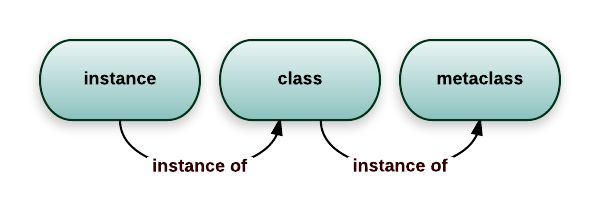 In Python, classes are also objects that create instances. Classes are created by metaclasses, meaning that classes are instances of metaclasses
>>> class Foo:
...     pass
...
>>> isinstance(Foo, type)
True
In Python, you can create classes dynamically. This is what Python does when executing a class statement. To create classes, use the function type. The function takes a description of the class and returns the class.
type(class_name, base_classes, attributes)
For example:
>>> MyShinyClass = type('MyShinyClass', (), {})
>>> print(MyShinyClass)
<class '__main__.MyShinyClass'>
>>> print(MyShinyClass())
<__main__.MyShinyClass object at 0x8997cec>
What is a metaclass?
Metaclass - something that creates classes: a class factory. type — the built-in metaclass that Python uses. It is the basis for classes, including standard ones such as str:
>>> name = 'bob'
>>> name.__class__
<class 'str'>

>>> name.__class__.__class__
<class 'type'>
Metaclass selection
In Python 3, the metaclass is specified by the argument metaclass in the class header:
class Foo(Bar, metaclass=SomethingMeta):
    pass
Python selects a metaclass from the explicitly specified value and the metaclasses of the base classes. The selected metaclass must be compatible with metaclasses of all databases. If metaclass not specified and there are no special base classes, used type. Attribute __metaclass__ refers to Python 2 syntax and does not select a metaclass in Python 3.
Custom Metaclasses
An example of a metaclass that converts all attributes to uppercase:
class UpperAttrMetaclass(type):

    def __new__(upperattr_metaclass, future_class_name,
                future_class_parents, future_class_attr):

        uppercase_attr = {}
        for name, val in future_class_attr.items():
            if not name.startswith('__'):
                uppercase_attr[name.upper()] = val
            else:
                uppercase_attr[name] = val

        # reuse the type.__new__ method
        # this is basic OOP, nothing magic in there
        return type.__new__(upperattr_metaclass, future_class_name,
                            future_class_parents, uppercase_attr)
Metaclasses are mainly used to create APIs. A typical example is Django ORM. You could write something like this:
class Person(models.Model):
    name = models.CharField(max_length=30)
    age = models.IntegerField()
But if you write it like this:
guy = Person(name='bob', age='35')
print(guy.age)
What are descriptors
This is a mechanism in Python that allows you to customize access to object attributes. They are used to define behavior when an object attribute is accessed, changed, or deleted.
Implemented through three methods
- get(self, instance, owner) - called when an attribute is accessed
- set(self, instance, value) - called when the attribute changes
- delete(self, instance) - called when an attribute is deleted Descriptors can be defined as a separate class or inside another class. They are used for attributes with special behavior when read, modified, or deleted.
class Descriptor:
        def __get__(self, instance, owner):
                print(f"Getting attribute: {instance} from {owner}")
                return instance._value
        def __set__(self, instance, value):
                print(f"Setting attribute: {value} to {instance}")
                instance._value = value
        def __delete__(self, instance):
                print(f"Deleting attribute from {instance}")
                del instance._value
class MyClass:
        attribute = Descriptor()
        def __init__(self, value):
                self._value = value
my_object = MyClass(42)
print(my_object.attribute)
# Output: Getting attribute: <__main__.MyClass object ...> from <class '__main__.MyClass'>
# 42
my_object.attribute = 23
# Output: Setting attribute: 23 to <__main__.MyClass object at 0x10f5d5d90>
del my_object.attribute
# Output: Deleting attribute from <__main__.MyClass object at 0x10f5d5d90>
What is diamond problem MRO, MRO3
MRO (method resolution order) is the order in which Python looks for attributes and methods in a class and its base classes. Python 3 uses C3 linearization; the order can be seen in SomeClass.__mro__ or through SomeClass.mro(). More details in Python MRO HOWTO. The Diamond Problem is a problem that can occur with multiple inheritance, where two or more parent classes share a common ancestor.
If a child class tries to inherit from two such parent classes,
then there is ambiguity about which method to use from the common ancestor, that
may lead to errors and unexpected results.
class A1():
    def who_am_i(self):
        print("I am A1")

class A2():
    def who_am_i(self):
        print("I am A2")

class A3():
    def who_am_i(self):
        print("I am A3")

class B(A1, A2):
    pass

class C(A3):
    pass

class D(B, C):
    pass

d1 = D()
d1.who_am_i()
# I am A1
# D.__mro__: D, B, A1, A2, C, A3, object
SOLID
S – Single Responsibility
Каждый класс должен отвечать только за одну операцию.
O - Open-Closed
Классы должны быть открыты для расширения, но закрыты для модификации.
L - Liskov Substitution (Barbara Liskov's substitution principle)
Если П является подтипом Т, то любые объекты типа Т, присутствующие в программе, могут заменяться объектами типа П без негативных последствий для функциональности программы.
I - Interface Segregation
Не следует ставить клиент в зависимость от методов, которые он не использует.
D - Dependency Inversion
Модули верхнего уровня не должны зависеть от модулей нижнего уровня. И те, и другие должны зависеть от абстракций. Абстракции не должны зависеть от деталей. Детали должны зависеть от абстракций.
__init__ vs __new__
The main difference between these two methods is that __new__ handles object creation, and __init__ handles its initialization.
__new__ is called automatically when the class name is called (when an instance is created), whereas __init__ called every time an instance of the class is returned __new__, passing the returned instance to __init__ as a parameter selfso even if you stored the instance somewhere globally/statically and returned it every time from __new__, it will still be called every time __init__. From the above it follows that first it is called __new__, and then __init__
OOP principles
- Abstraction
- Inheritance
- Encapsulation
- Polymorphism
Inheritance — a way to create a class. Its essence lies in the fact that the functionality of a new class is inherited from an already existing class. The new class is called a derived (child) class. Existing - basic (parent).
Encapsulation
Encapsulation separates the public API of an object from its implementation details. Python does not prohibit access to attributes at the language level:
_name— an agreement on a non-public API, and__nameincludes name mangling to protect against accidental conflicts in heirs. Polymorphism - a feature of OOP that allows you to use one function for different forms (data types). Abstraction is used to hide the internal characteristics of a function from users.
Encapsulation
There are no enforced access levels in Python public, protected and private.
nameusually refers to a public API;_nameby convention considered an internal part;__nameconverted to_Class__name, but remains accessible and is not a security mechanism.
Magic method
Magic methods - special methods in Python that allow you to determine the behavior of a class object when calling operators and the properties of objects during their interaction. They are denoted by double underlining: __new__
Creating and Deleting Objects
new(cls, [, …]) - method for creating a class object. Takes a class as input and returns an object
init (self, [, …]) - method for initializing an object obtained from new
init_subclass (cls) - allows you to override the creation of a subclass, for example adding new attributes automatically
del(self) - finalizer with non-guaranteed timing and calling context. To release resources use context manager (with) or explicit close()rather than rely on __del__.
General properties of objects
repr(self) - information about the object, defines the behavior of the repr() function, more intended for debugging machine-oriented output str(self) - information about the object, defines the behavior of the str() function, more intended for human reading bytes(self) - information about the object in bytes format(self) - definition for the format() function
Other categories that can be defined by magic methods:
- Comparison between objects: >, <, ==, ≥, ≤,
- Accessing Object Attributes
- Sequences: len, getitem, setitem, delitem, missing, reversed
- Unary operators, arithmetic operators
- Type Conversions
- Context managers
- etc.
Mixin
Mixin is a class that provides implementations of methods for reuse by other classes. This is a kind of alternative to multiple inheritance of several parent classes, which can complicate and bloat the code. A mixin allows you to reuse logic without adding complex connections between classes. Python doesn't provide any special syntax for mixins: technically, they're just classes used through multiple inheritance. Strict requirement to inherit only from
objectno. In practice, mixins are kept small, focused on one behavior, and compatible with cooperative callingsuper().
class GraphicalEntity:
    def __init__(self, pos_x, pos_y, size_x, size_y):
        self.pos_x = pos_x
        self.pos_y = pos_y
        self.size_x = size_x
        self.size_y = size_y


class ResizableMixin:
    def resize(self, size_x, size_y):
        self.size_x = size_x
        self.size_y = size_y


class ResizableGraphicalEntity(GraphicalEntity, ResizableMixin):
    pass

rge = ResizableGraphicalEntity(5, 4, 200, 300)
rge.resize(1000, 2000)
@classmethod, @staticmethod, @property
@classmethod, @staticmethod, and @property are class method decorators in Python.
@classmethod used to create methods that will operate on the class as a whole, rather than on an individual instance. This method takes a class rather than an object instance as its first parameter, and is often used to create factory methods and methods that operate on class-level methods.
@staticmethod decorator works like @classmethod, but it doesn't access the class as the first parameter.
@property A decorator is used to create object properties that can be gotten and set but look like normal object attributes. This allows you to control access to object attributes by setting access conditions and the ability to implement additional logic when reading, setting or deleting an attribute. For example, an explicit use of decorators might look like this:
class MyClass:
    def __init__(self, value):
        self._value = value

    @classmethod
    def from_string(cls, input_string):
        value = cls.process_input_string(input_string)
        return cls(value)

    @staticmethod
    def process_input_string(input_string):
        return int(input_string)

    @property
    def value(self):
        return self._value

    @value.setter
    def value(self, new_value):
        if new_value < 0:
            raise ValueError("Value must be positive")
        self._value = new_value
__slots__
__slots__ allows you to explicitly specify a set of instance attributes and, in some cases, reduce memory consumption. When you define a class, Python creates a dictionary for each instance of that class that contains all of its attributes. This can be beneficial if you have a lot of different attributes, but can be very memory-intensive if you create many instances of a class with few attributes. Attribute __slots__ allows you to define which attributes should actually be created for each instance of a class, and at what point they can be retrieved. Separate __dict__ may not exist unless it is inherited and explicitly included in slots. Subclass without __slots__ will get the dictionary again. There is no universal guarantee of acceleration - it's worth measuring. For example, if you have a class Person with attributes name and age, you can determine __slots__ as follows:
class Person:
    __slots__ = ('name', 'age')

    def __init__(self, name, age):
        self.name = name
        self.age = age
Instances of this particular class without inheritance __dict__ will be able to store name and age; The behavior of subclasses depends on their own slots.
Tasks
Fibonacci
def fib(n):
    if n <= 1:
        return n
    return fib(n - 1) + fib(n - 2)
def fib(n):
    a, b = 0, 1
    for _ in range(n):
        a, b = b, a + b
    return a
Most common element
from collections import Counter
def counter(n):
    cnt = Counter(n)
    return cnt.most_common(1)[0][0]
Decorator
from time import monotonic

def decorator(func):
    def wrapper(*args, **kwargs):
        start = monotonic()
        result = func(*args, **kwargs)
        elapsed = monotonic() - start
        print(f'Время выполнения функции: {elapsed:.3f} с')
        return result

    return wrapper

@decorator
def func(arr):
    return len(arr[1])
Write a decorator that will catch errors and repeat the function at most N times.
import functools
def retry(func):
    @functools.wraps(func)
    def wrapper(*args, **kwargs):
        max_retries = 3
        for i in range(max_retries):
            try:
                result = func(*args, **kwargs)
                return result
            except Exception as e:
                print(f'Error occurred: {e}. Retrying ({i+1}/{max_retries})...')
        raise Exception(f'Function {func.__name__} failed after {max_retries} attempts.')
    return wrapper
Inheritance, OOP
class A:
    def do(self):
        print('Hello from A')

class B(A):
    pass

b = B()
b.do()
Return the largest value in the dictionary
def func(dct):
        new_dct = dict(sorted(dct.items(), key=lambda item: item[1]))
        return sorted(dct.items(), key=lambda item: item[1])
Return a number that appears only once
def func(num):
        for i in num:
                if num.count(i) == 1:
                        return i
Intersection of two arrays
def func(num1, num2):
        lst = []
        for i in num1:
                if i in num2:
                        lst.append(i)
        return list(set(lst))
# ----------------------
def func(num1, num2):
        return list(set(num1)&set(num2))
# & - обозначает побитовую операцию "И" между двумя целыми числами.
Return the index of a non-repeating letter in a string
def firstUniqChar(s):
        for i in s:
                if s.count(i) == 1:
                        return s.index(i)
Palindrome
def isPalindrome(s):
        arr = [i.lower() for i in s if i.isalnum()]
        return arr == list(reversed(arr))
Setter getter what will output
class Variable:
    def __init__(self, name, value):
        self._name = name
        self._value = value

    @property
    def value(self):
        print(self._name, 'GET', self._value)
        return self._value

    @value.setter
    def value(self, value):
        print(self._name, 'SET', self._value)
        self._value = value


var_1 = Variable('var_1', 'val_1')
var_2 = Variable('var_2', 'val_2')
var_1.value, var_2.value = var_2.value, var_1.value

# var_2 GET val_2
# var_1 GET val_1
# var_1 SET val_1
# var_2 SET val_2
Official sources
- Python language reference, standard types
- Data model, descriptor HOWTO, MRO HOWTO
threading,multiprocessing,asynciogc, free-threaded CPython