CI/CD stands for Continuous Integration (CI) and Continuous Delivery/Deployment (CD). These are practices that focus on automating application development and delivery processes to make it faster and easier to release changes.
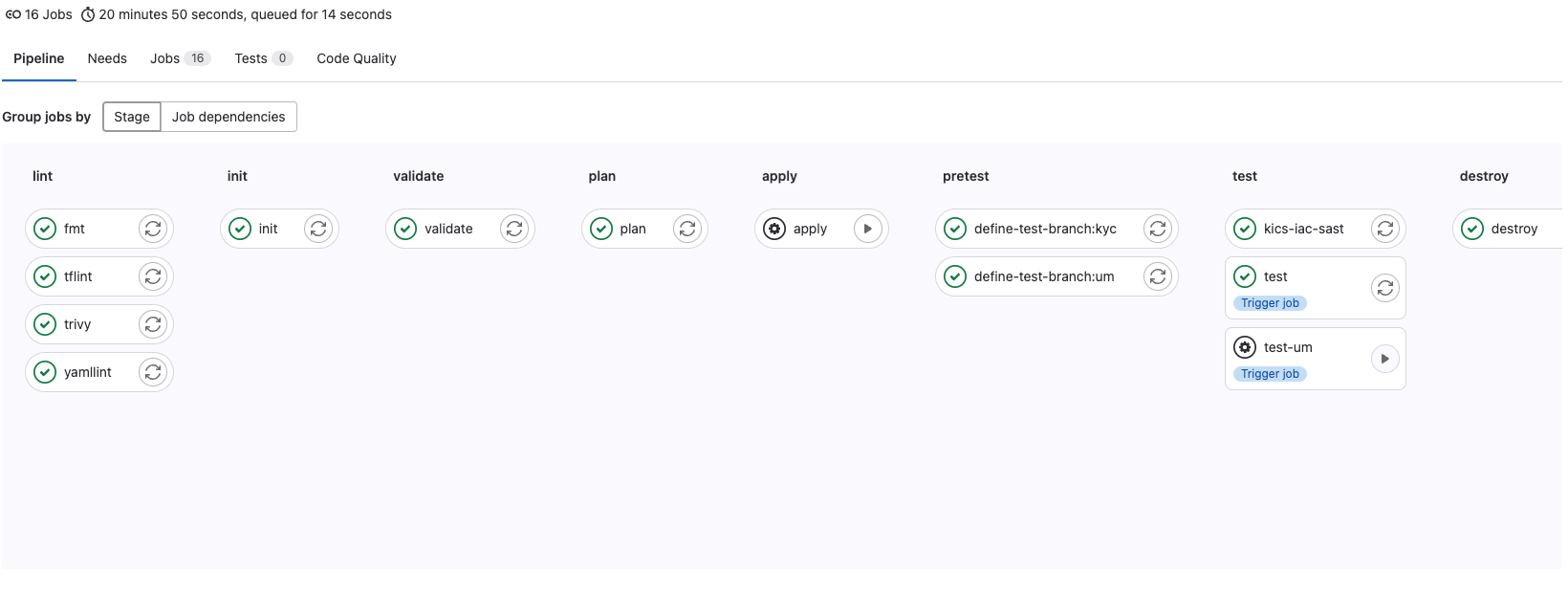
Continuous Integration (CI)
Continuous Integration is the practice of continuously integrating code into the main development branch. When developers make changes to the code, those changes are automatically tested and compiled, helping to detect and fix problems early.
Basic principles of CI:
- Frequent commits: Developers regularly (and frequently) commit code to the repository.
- Automated tests: Tests are automatically launched on configured events - for example, when a push or when a merge request is created.
- Quick bug fixes: Problems and bugs identified during the CI phase are fixed as soon as possible.
Continuous Delivery (CD)
Continuous Delivery is the practice of ensuring that your code is always ready to deploy to production. This includes additional stages of testing and automation of subsequent stages before manual deployment.
Basic principles of CD:
- Automated releases: All code changes that pass the CI stage automatically move to the delivery stage.
- The product is always ready for release: The system is in a state where it can be safely deployed at any time.
Continuous Deployment (also CD)
Continuous Deployment, although it has a similar acronym CD, differs from Continuous Delivery in that code changes are automatically deployed to production without manual intervention, provided they pass all testing steps.
Basic principles of Continuous Deployment:
- Automatic deployment: Change unfolds without human intervention.
- Quick feedback: Immediate response to changes, allowing for faster feedback from end users.
How CI/CD works:
- Commit code: A developer commits changes to the codebase.
- Build and Test (CI): Changes are automatically tested for errors and problems using automated tests and compiled into an artifact (for example, a Docker image).
- Additional stages of testing and approval (CD - Continuous Delivery): The code goes through additional stages of testing and possibly an approval stage before deployment.
- Deployment (CD - Continuous Deployment): The code is automatically deployed to production (if we are talking about Continuous Deployment) or ready for manual deployment (if we are talking about Continuous Delivery).
Who does all this work?
Using the example Gitlab GitLab Runner is a GitLab CI/CD component that is used to run CI/CD jobs and send the results back to GitLab. Each task (job) is defined in
.gitlab-ci.ymlfile in your repository and will be executed in Runner when the conditions for executing this task are satisfied.
Key aspects of GitLab Runner:
- Runner registration:
- Runner can be installed on various OS and cloud platforms.
- The Runner must be registered with GitLab before it can start processing issues.
- Executor:
- Executor determines how the Runner will perform tasks. For example, it can run tasks in Docker containers, on a virtual machine, or even on a physical host.
- Examples of executors:
shell,docker,kubernetes,sshand others.docker-machineexecutor is deprecated; For autoscaling, GitLab recommends Docker Autoscaler.
- Concurrency and Scalability:
- You can determine how many tasks Runner can perform simultaneously.
- You can have multiple Runners working together to provide scalability and fault tolerance.
- Environment Isolation:
- Tasks can be completed in isolated environments, such as using Docker, to provide a clean, manageable, and reproducible build environment.
- Cache and Artifacts:
- Runner handles caching and artifact transfer to optimize CI/CD processes, minimizing build time and ensuring results are transferred between tasks.
- Tags:
- You can use tags to control which Runners will perform certain tasks, allowing, for example, certain tasks to be performed on Runners with special characteristics or resources.
- Pipelines:
- GitLab creates and orchestrates the pipeline, and Runner executes the jobs assigned to it. The order is set by stages, dependencies/needs and rules in
.gitlab-ci.yml.
- Security:
- You control where and how Runner runs, giving you flexibility and control over the security of your CI/CD environment.
Usage example:
- Installation and registration of Runner: Once Runner is installed on a suitable host, it is registered using a token from your GitLab.
- Configuration
.gitlab-ci.yml: Define the pipeline, jobs, stages, scripts and so on in your.gitlab-ci.ymlfile in the project repository. - Automation: When code is pushed to a repository or a merge request is created, GitLab CI/CD automatically creates and executes a pipeline, using Runner to complete tasks.
stages:
  - lint
  - test
  - build

lint_code:
  image: python:3.13-slim
  stage: lint
  script:
    - pip install pre-commit black
    - pre-commit run --all-files
    - black --check .

run_tests:
  image: python:3.13-slim
  stage: test
  script:
    - pip install -r requirements.txt
    - pytest

build_image:
  image: docker:29-cli
  stage: build
  services:
    - docker:29-dind
  variables:
    DOCKER_TLS_CERTDIR: "/certs"
    IMAGE_NAME: "$CI_REGISTRY_IMAGE:$CI_COMMIT_REF_SLUG"
  before_script:
    - echo "$CI_JOB_TOKEN" | docker login -u gitlab-ci-token --password-stdin "$CI_REGISTRY"
  script:
    - docker build --pull -t "$IMAGE_NAME" .
    - docker push "$IMAGE_NAME"
  rules:
    - if: '$CI_COMMIT_BRANCH == $CI_DEFAULT_BRANCH || $CI_COMMIT_TAG'
The Docker-in-Docker option requires a Runner configured for this mode (usually privileged). In production, it is worth choosing and documenting one supported build strategy: DinD, socket binding or BuildKit.
Official documentation
- GitLab CI/CD pipelines
- GitLab Runner
- Docker-in-Docker in GitLab CI
- GitLab Container Registry authentication